
A one-minute daily entry
Jot down a friction, a spark and an optional commitment, with no streak pressure.
A quiet journal built on ikigai, found in small everyday things. Note what gives you energy and what creates friction in under a minute a day, and watch a living purpose map grow from your own words.
Free · Pay what you want · Future updates included
macOS 12 or later, Intel and Apple Silicon · AI features are optional and need your own API key · Checkout opens on Gumroad
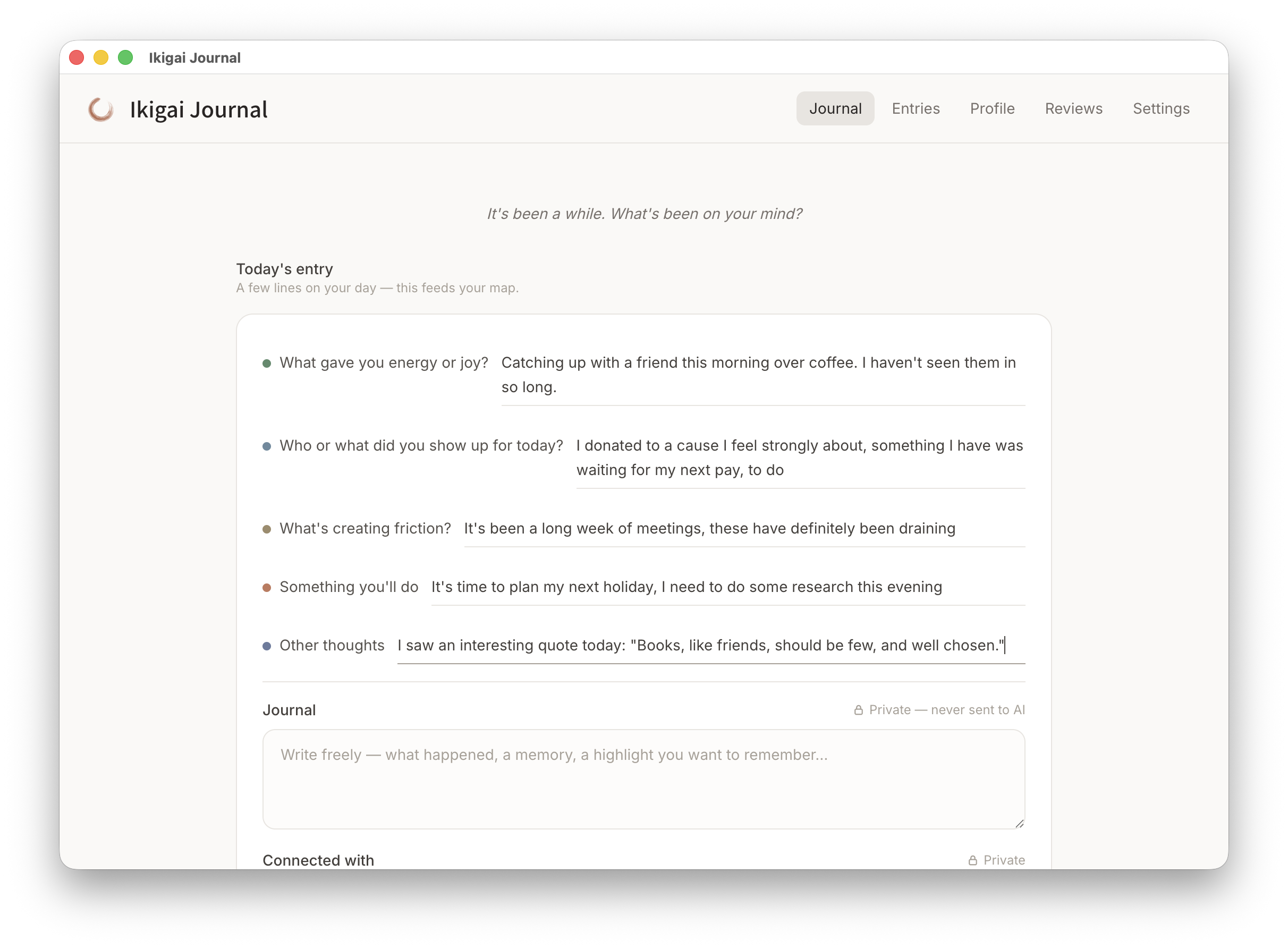
Notice what gives you energy, what creates friction, and what feels worth getting up for. One quiet minute a day is enough to begin.
Jot down a friction, a spark and an optional commitment, with no streak pressure.
Your entries gather into a map of what recurs, in your own words.
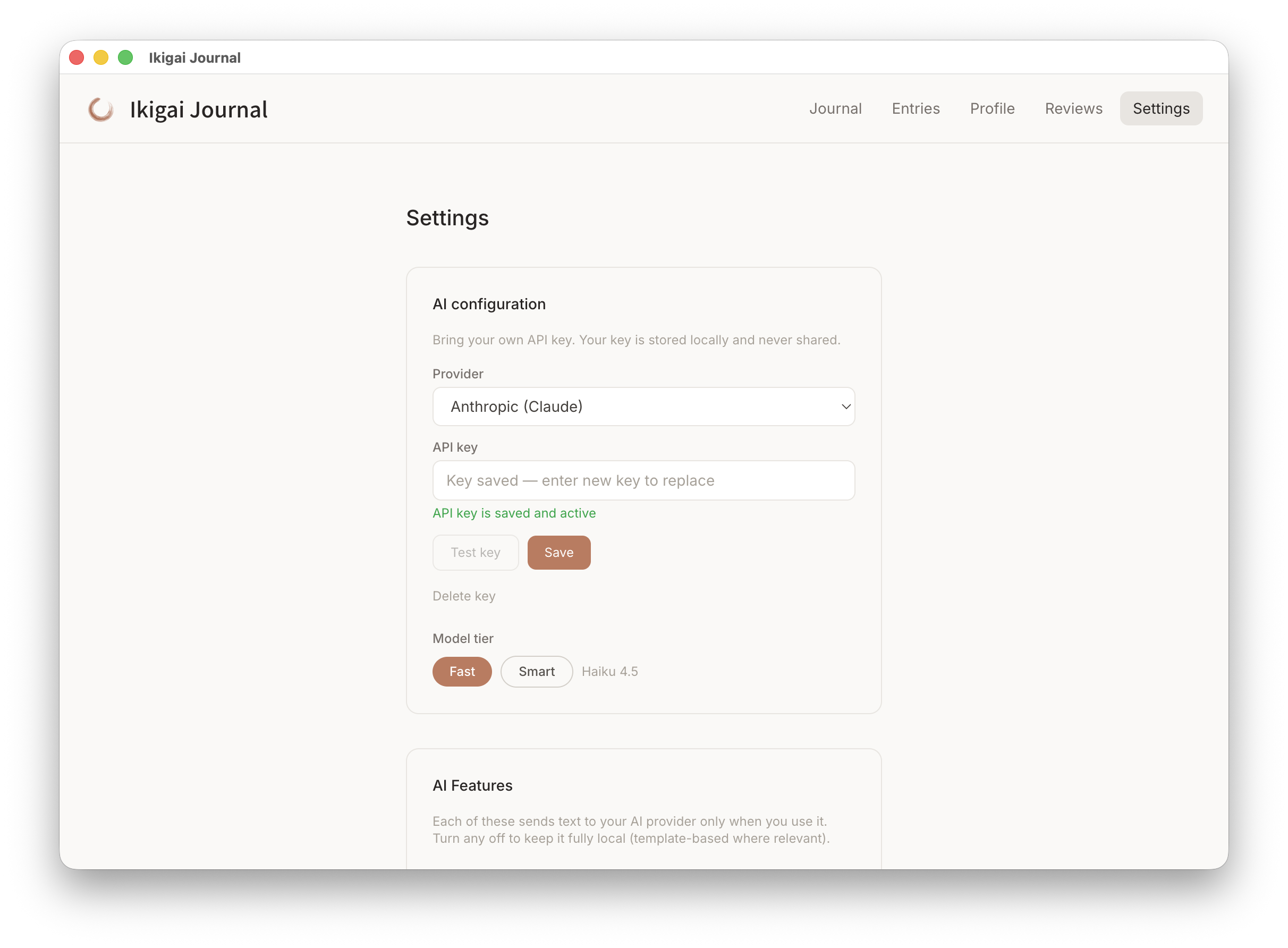
Everything runs on your Mac. AI reflection is optional and uses your own key.
Real screens from the app. Select any screenshot to enlarge it.
The journal is the front door. Write your first friction and spark in under a minute.

Search your entries and star the moments worth remembering as highlights.

Look back over a period to see the patterns in your sparks, friction, and follow-through.


Pay what you want · Future updates included
At its heart, ikigai (生き甲斤) means "a reason to get up in the morning." It's usually small and ordinary — a morning ritual, a craft, being useful to someone, a good conversation. It's spread across your whole life, and you already have some of it.
In recent years, ikigai has become widely known through a four-circle framework — what you love, what you're good at, what the world needs, and what you can be paid for. It's a useful lens for seeing where those overlap.
Ikigai Journal takes both into account. The everyday side comes first — a minute of journaling a day, growing into a living purpose map of what lifts you and what costs you. The four lenses are here too, through the optional discovery and an optional AI portrait. It won't score you or tell you who to be — it just helps you notice where your energy goes, and protect more of what's worth getting up for.
The complete feature list, who the journal suits, the daily loop, setup steps and answers to common questions. Open any heading for the full answer.
What created friction today? Naming it is the first step to removing it.
What gave you energy? The small moments that are easy to miss.
A rotating prompt drawn from the four ikigai lenses — what you love, do well, can offer, and are valued for.
One small commitment. "If a meeting has no agenda, then I decline it." Subtraction, one friction at a time.
First time installing one of these apps? The Installing an app guide walks through downloading it from your Gumroad Library and installing it on your Mac.
No. The journal, the purpose map, discovery, and reviews all work fully without AI. If you want it, you bring your own Anthropic or OpenAI key — the AI runs through your own account with your chosen provider, and nothing is sent unless you click. It's there to reflect your own words back: the structured map prompts and recent entries you choose to share.
No. Everything stays on your Mac — entries, your purpose map, discovery answers, and reviews. There is no account and no sync. If you use AI, only your structured map prompts and recent entries are sent to your chosen provider, and only when you click.
Yes, in two ways. The app automatically snapshots your data each time it starts, keeping your last 10 backups as a safety net. For a portable copy you control, Settings also has a full manual backup and restore — export your profile as a single JSON file and import it on another machine or after a reinstall, with a safety backup saved automatically before any restore. API keys are excluded from backups. If it's been a while since your last manual export, the app will gently remind you.
Ikigai Journal is code-signed with an Apple Developer ID and notarized by Apple, for both Intel and Apple Silicon Macs. It opens cleanly with no security warnings, and Apple has scanned the build for malicious code. Combined with a fully local, offline design, you're installing software you can trust.
Yes. Ikigai Journal is code-signed with an Apple Developer ID and notarized by Apple, for both Intel and Apple Silicon Macs. That means macOS verifies it opens cleanly without security warnings, and Apple has checked the build for malicious code.
Currently macOS only (12 or later). A Windows version may follow based on demand.
The four-circle framework — what you love, what you're good at, what the world needs, and what you can be paid for — is how ikigai has become widely known in recent years, and it's a useful lens. Its older, everyday meaning is simpler: "a reason to get up in the morning", often found in small things across your whole life. Ikigai Journal takes both into account — the everyday side through quick daily journaling and a living purpose map, and the four lenses through optional discovery and an optional AI portrait.
No. Ikigai Journal is a reflective journaling tool, not therapy, counselling, or medical advice. The optional AI is there to reflect your own words back — treat it as a reflective aid, not advice. If you're struggling, please reach out to a qualified professional.
No. Ikigai Journal is free, and you can pay what you want if you'd like to support it. Get it from this page and it stays in your Gumroad Library with free updates, whether or not you are a member. If you use the optional AI features, you bring your own API key from Anthropic or OpenAI and pay them directly at their usage rates.
Prices are in USD and payment is processed securely by Gumroad. Gumroad may show the price converted to your local currency as a guide, but your card is charged in USD, so your bank may add a small foreign transaction fee.
If you buy the app, every future update to it is included at no extra cost. Members get updates while their membership is active. You can see the full list of changes on the changelog page.
Step-by-step guides, from the daily entry to your purpose map and backups, are in the Ikigai Journal help pages. Release notes are on the changelog page. For anything else, email david@tiongcreative.com.au.
Free · Pay what you want · Future updates included
I have worked across product management, agency ownership, SaaS support and product enablement, and I am the person behind davidtiong.com. I built Ikigai Journal because most "find your purpose" tools start and end with that one four-circle diagram. The lenses are useful — but ikigai, at its heart, is quieter: it's in the small things you'd get up for anyway. I wanted a journal that noticed those first, and kept the bigger framework as a gentle backdrop.
