
Next date worked out
The next date comes from the schedule or from the day you did it.
A private tracker for renewals, maintenance, appointments and licences on your Mac. It keeps a history of every time you did each one and works out the next date for you, with reminders sent through Apple Reminders.
$15 USD · One-time purchase · Future updates included
14-day money-back guarantee · macOS 13 or later, Intel and Apple Silicon · Checkout opens on Gumroad
Renewals, maintenance, appointments, licences and insurance in one place, with a record of each time you dealt with them.
The next date comes from the schedule or from the day you did it.
Done, skipped and rescheduled entries are kept, with undo.
Reminders in Apple Reminders arrive when Due Again is closed.
Real screens from the app. Select any screenshot to enlarge it.
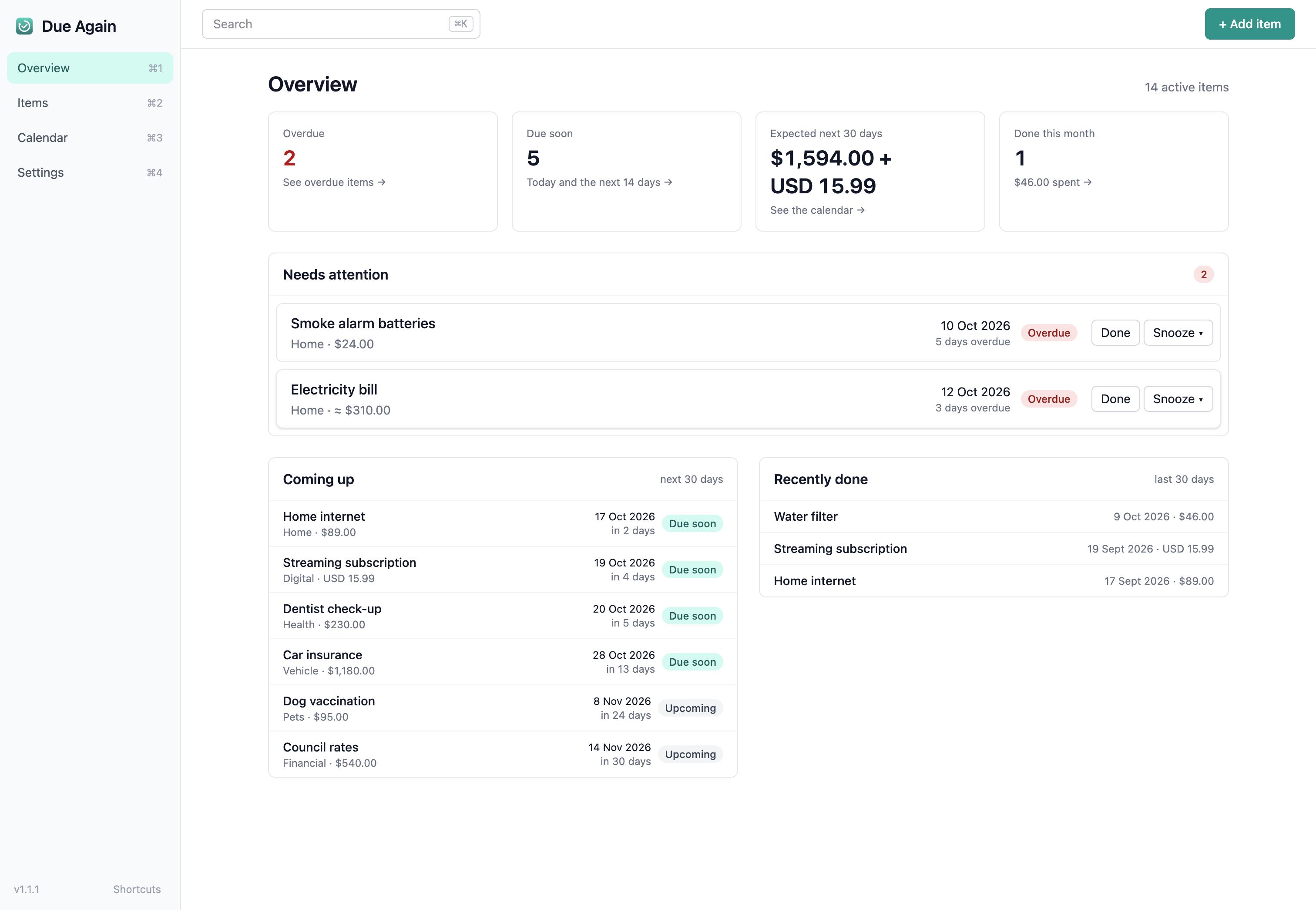
Overview shows what is overdue, what is due soon and the expected cost over the next 30 days, with one-click Done on each item, and Snooze and Skip where they apply.
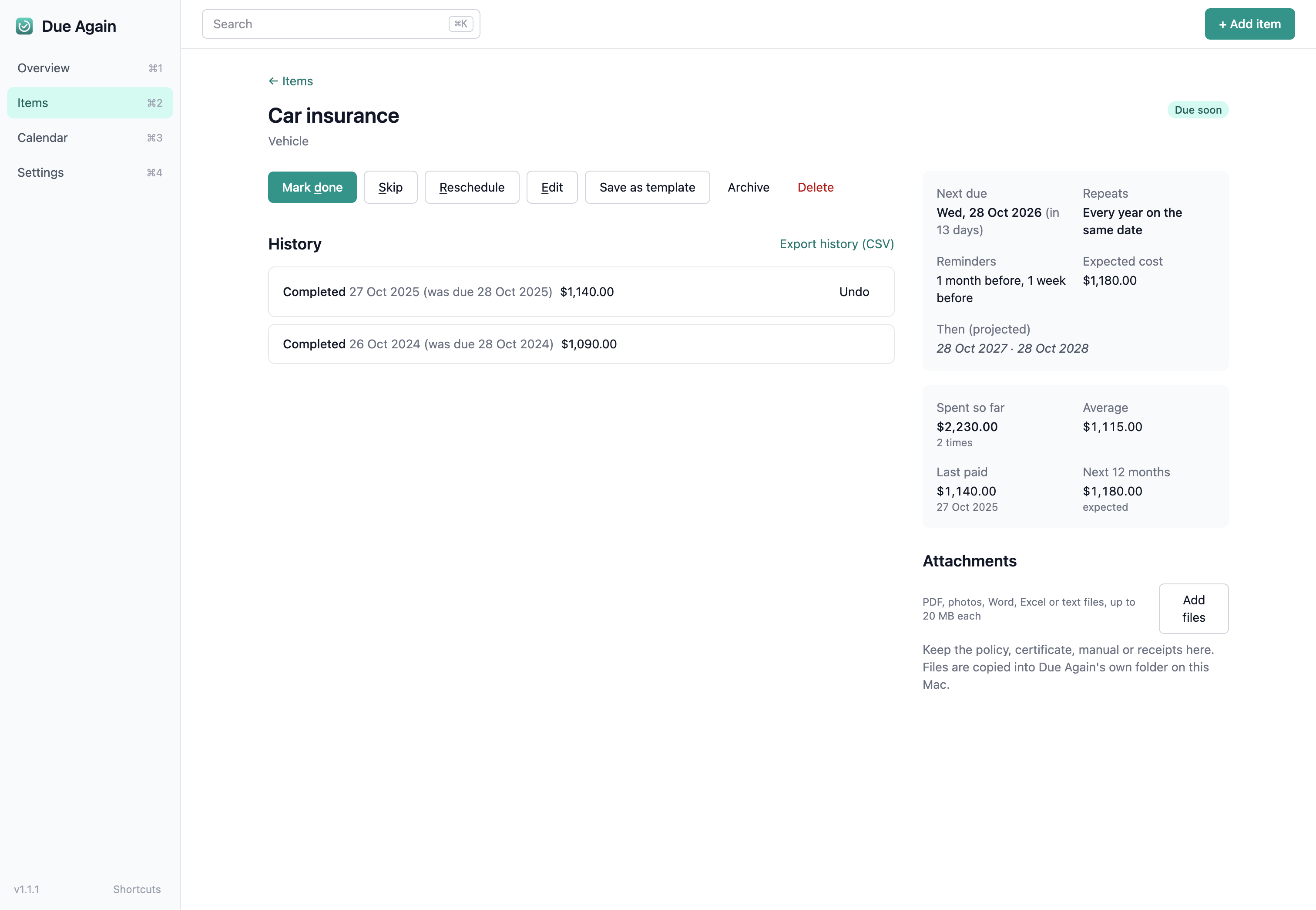
Each item has its own page with the schedule, the next dates, every time it was done, what it cost and the files you attached, like the policy or the last receipt.
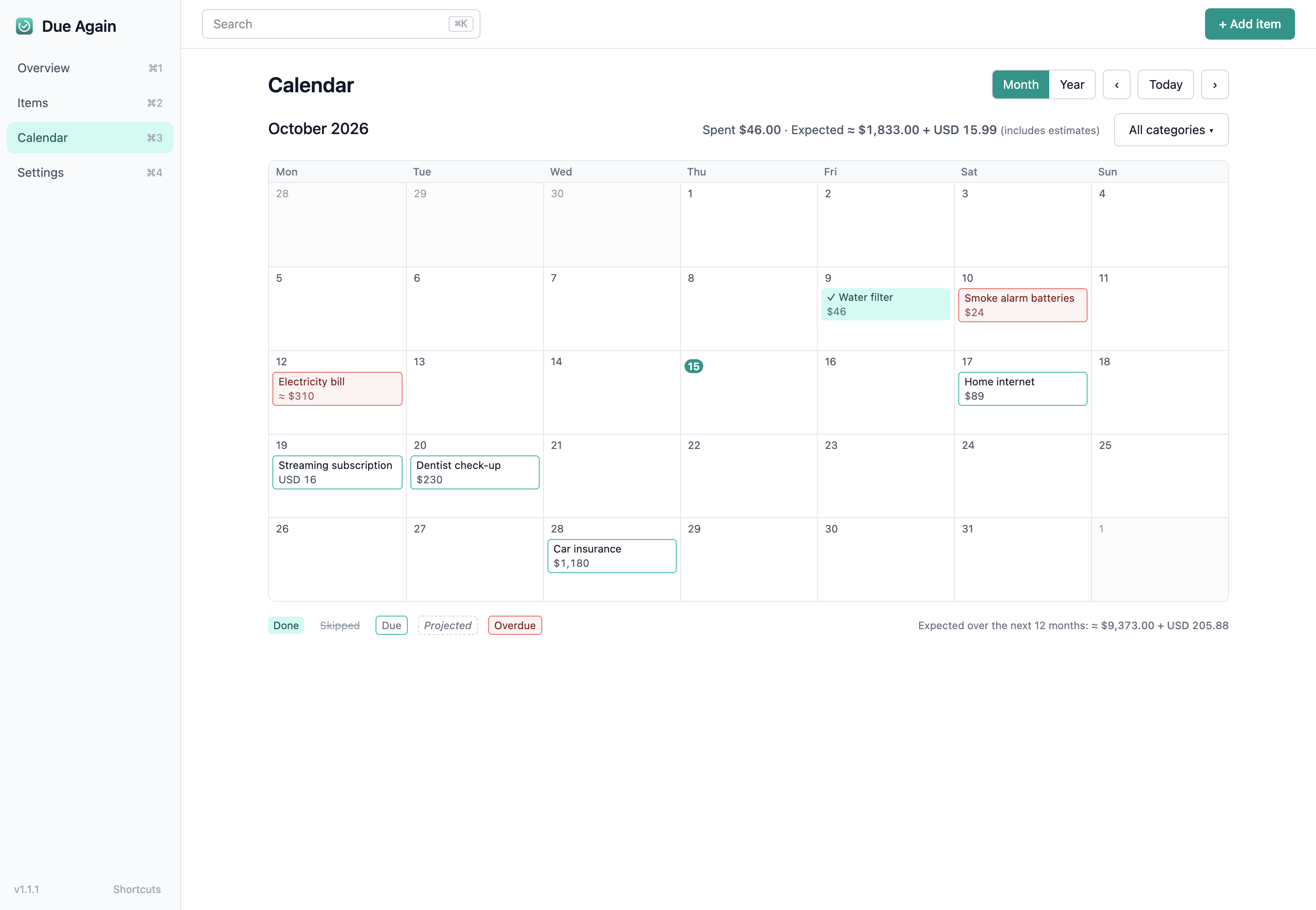
The calendar shows a month or a whole year, with what was done, skipped, due and projected. Each entry shows its cost, including the expected costs for the year ahead.
14-day money-back guarantee · Future updates included
The complete feature list, who the app suits, setup steps and answers to common questions. Open any heading for the full answer.
First time installing one of these apps? The Installing an app guide walks through downloading it from your Gumroad Library and installing it on your Mac.
Everything is stored on your Mac, and the only network request the app makes is a check of a version file on tiongcreative.com.au, with no data sent. Apple Reminders handles its own syncing, outside Due Again.
No. There are no accounts, so you open the app and start adding items.
No. Alerts come from Apple Reminders, so they show up whether or not Due Again is open, and Due Again does not run in the background.
Due Again stores your data on your Mac. If you connect Apple Reminders, the item names and dates appear in a list there, and if you choose a backup folder in iCloud Drive or Dropbox your backups are copied into it.
Yes, and the Backups section under Everything included covers how, including daily backups, named restore points and an optional backup folder.
No, it only dismisses the reminder. You mark the item done in Due Again, which records it in the history and sets up the next reminder.
No. Due Again is a Mac app only, for macOS 13 or later, on Intel and Apple Silicon.
Individual app purchases include a 14-day money-back guarantee, so install it, try it, and if it does not suit your needs, email david@tiongcreative.com.au with your order details within 14 days of purchase.
If your purchase is fully refunded and the licence ends, you must stop using the app and delete copies and installers held under that licence. Your own documents and exported work remain yours to keep.
When you buy the app on its own there is no subscription, and future updates to it are included.
No. Due Again is a one-time purchase. Or get every app through the Tiong Creative membership with updates while your membership is active.
Prices are in USD and payment is processed securely by Gumroad. Gumroad may show the price converted to your local currency as a guide, but your card is charged in USD, so your bank may add a small foreign transaction fee.
See the full list of changes on the changelog page. To update, download the latest version from your Gumroad Library, open the DMG, and drag the app to Applications. Choose Replace when macOS asks. Your data and settings are kept automatically.
Step-by-step guides, from adding items and Apple Reminders to the calendar and backups, are in the Due Again help pages. Release notes are on the changelog page. For anything else, email david@tiongcreative.com.au.
$15 USD one-time purchase · 14-day money-back guarantee · Future updates included
I have worked across product management, agency ownership, SaaS support and product enablement, and I am the person behind davidtiong.com. Due Again runs on your Mac, and you can export your items and history as CSV or JSON, or use a backup folder to move everything to another Mac.
